
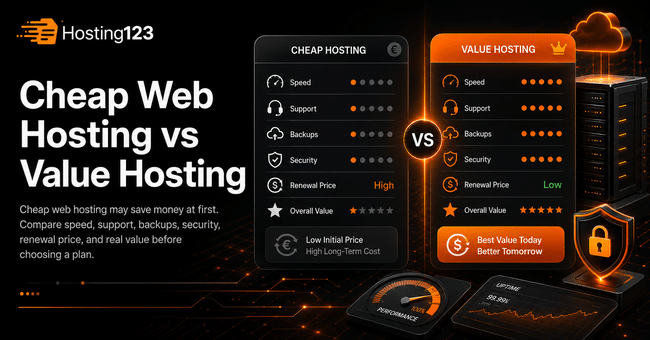
Cheap web hosting can work for small websites, but the lowest price does not always give the best value. Hosting123 recommends comparing speed, support, backups, security, renewal cost, and migration help before buying. As a result, you can avoid hidden costs and choose a more reliable hosting plan.
Quick Answer: Is Cheap Web Hosting Worth It?
Cheap web hosting can be worth it when your website is small, simple, and new.
However, price should not be your only decision point. You also need to check performance, storage, email limits, backup policy, SSL, and support quality.
In short, cheap hosting saves money at first. Value hosting protects your website better as it grows.
What Does Cheap Web Hosting Usually Include?
Cheap web hosting usually gives you the basic resources needed to publish a website.
For example, you may get disk space, a control panel, email accounts, SSL, and one-click WordPress installation.
However, every provider defines “cheap” differently. Therefore, you should always check what the package actually includes.
A low monthly price may look attractive. Still, the real cost appears when you need support, backups, migration, or more resources.
What Is Value Hosting?
Value hosting focuses on the total benefit you receive, not only the lowest price.
A value-focused hosting plan gives you a better balance of performance, support, security, backups, and growth potential.
In other words, value hosting does not always mean expensive hosting. It means the package gives you enough resources for your actual needs.
For this reason, a slightly higher monthly price may save you money later.
Cheap Hosting vs Value Hosting Comparison
Use this table before choosing a hosting plan.
| Comparison point | Cheap web hosting | Value hosting |
|---|---|---|
| Main focus | Lowest starting price | Best long-term return |
| Speed | May be enough for small sites | Usually more stable |
| Support | May be limited | Usually more helpful |
| Backups | May be unclear or limited | Usually easier to trust |
| Security | Basic protection | Stronger protection options |
| Renewal price | Can increase later | Easier to evaluate clearly |
| Migration support | May cost extra | Often included or supported |
| Growth potential | Limited for growing sites | Better for long-term use |
This table helps you compare hosting plans more clearly. As a result, you do not choose a package only because it looks cheap.
1. Look Beyond the Monthly Price
The first price you see is not always the real cost.
Some hosting plans look cheap at checkout. However, important features may require extra payment later.
Before buying, check these cost items:
- Hosting renewal price
- Domain renewal price
- SSL cost
- Backup cost
- Email account limits
- Website migration cost
- Support level
- Upgrade cost
Therefore, calculate the yearly cost, not only the monthly price.
2. Check the Renewal Price
Many users compare only the first payment. This can be a mistake.
A cheap first-year plan may become more expensive during renewal. In that case, your hosting cost can increase when you are already using the service.
Before you buy, ask one simple question:
How much will I pay when the plan renews?
This question helps you avoid surprise costs. Also, it gives you a clearer view of the real hosting budget.
3. Compare Speed and Server Performance
Website speed affects user experience, SEO, and conversions.
Cheap hosting can handle a small website. However, it may struggle when traffic grows or plugins increase.
Pay attention to these points:
- Server response time
- SSD or NVMe storage
- LiteSpeed support
- PHP version
- Cache compatibility
- Resource limits
- Traffic capacity
In addition, test your website after setup. A hosting plan should feel fast in real use, not only on the sales page.
4. Review Backup Protection
Backups matter more than many beginners think.
If your site breaks, gets hacked, or loses data, backups can save your business. However, cheap hosting plans may offer limited backup options.
Ask these questions before buying:
| Backup question | Why it matters |
|---|---|
| How often do you take backups? | Recent backups reduce data loss |
| How long do you keep backups? | Older restore points give more safety |
| Can I restore backups easily? | Easy restore saves time |
| Are email backups included? | Business communication stays protected |
| Is backup restore free? | Extra restore fees increase cost |
A hosting plan without clear backup rules can create risk. Therefore, do not ignore this part.
5. Do Not Underestimate Support Quality
Support can turn a cheap plan into an expensive problem.
When your website goes down, you need fast and clear help. If support responds late, you may lose visitors, leads, and sales.
Before buying, check the support channels. For example, ticket, live chat, phone, or WhatsApp support can make a big difference.
Also, review what support actually covers. Some providers only answer basic questions. Others help with migration, WordPress issues, email setup, and performance guidance.
As a result, better support often creates better value.
6. Check Security Features
Cheap web hosting should still protect your website.
At minimum, your hosting plan should support SSL, secure panel access, updated PHP versions, and basic server protection.
However, growing websites need stronger security planning.
Check these areas:
- SSL certificate
- Malware scanning
- Firewall protection
- DDoS protection
- Updated PHP versions
- Secure control panel access
- Regular backups
In addition, keep your WordPress themes and plugins updated. Hosting security and website maintenance should work together.
7. Think About Website Growth
A hosting plan should match your current needs. However, it should also leave room for growth.
Your website may start small. Later, you may add blog content, landing pages, WooCommerce, forms, images, or email accounts.
If your hosting plan has very limited resources, you may need to upgrade quickly.
Therefore, ask this before buying:
Will this plan still work if my website grows in six months?
This question helps you choose value, not just a low starting price.
Cheap Hosting Is Good When…
Cheap web hosting can be a smart choice in the right situation.
It may work well when:
- You are starting a new website.
- Your traffic is low.
- Your website has only a few pages.
- You do not use many plugins.
- You do not run an online store.
- You have a limited starting budget.
- You can upgrade later when needed.
In short, cheap hosting can be enough for simple projects. However, it should still include basic speed, SSL, backups, and support.
Value Hosting Is Better When…
Value hosting becomes more important when your website supports your business.
For example, a corporate website, lead generation page, WooCommerce store, or busy WordPress blog needs more reliable infrastructure.
Value hosting makes more sense when:
- Your website brings customers.
- You publish content regularly.
- You use WordPress plugins.
- You need business email.
- You care about speed.
- You want backup protection.
- You need migration support.
- You plan to grow.
In this case, the cheapest plan may not serve your goal. Instead, choose a plan that protects performance and business continuity.
For WordPress-based websites, you can also review Hosting123’s WordPress Hosting plans.
Cheap Hosting Checklist Before You Buy
Before choosing a cheap web hosting plan, answer these questions:
- Does the price change at renewal?
- Is SSL included?
- Are backups included?
- Can I restore backups easily?
- Is the storage SSD or NVMe?
- Are CPU and RAM limits clear?
- Does the plan support WordPress properly?
- Is email hosting included?
- Does support respond quickly?
- Can I upgrade without moving everything?
This checklist helps you avoid weak packages. Also, it makes your comparison easier.
Migration Can Change the Real Cost
Migration is another important cost point.
A cheap provider may charge extra for website transfer. In addition, moving a website without support can create downtime, email problems, or DNS mistakes.
Before you choose a plan, check whether migration help is included.
If you already have a website, Hosting123’s free website migration service can help you move your site more safely.
Final Decision: Cheap or Value Hosting?
Cheap web hosting can help you start with a low budget. However, value hosting gives you a better long-term decision when your website matters to your business.
First, compare the real yearly cost. Then check speed, backups, support, security, and upgrade options.
If the low-cost plan covers your needs, it can be enough. On the other hand, if your website brings leads, sales, or customer trust, value hosting usually makes more sense.
In conclusion, do not only ask, “Which hosting is cheaper?” Instead, ask, “Which hosting gives me more value for my money?”
Frequently Asked Questions
What is cheap web hosting?
Cheap web hosting is a low-cost hosting plan that helps you publish a website with basic resources. It can work for small websites, blogs, and beginner projects.
Is cheap web hosting bad?
Not always. Cheap web hosting can be useful for simple websites. However, you should check the renewal price, backups, support, security, and resource limits before buying.
What is the difference between cheap hosting and value hosting?
Cheap hosting focuses mainly on the lowest price. Value hosting focuses on the overall benefit, including speed, support, backups, security, and long-term reliability.
Should I choose cheap hosting for WordPress?
You can choose cheap hosting for a small WordPress site. However, if you use many plugins, publish often, or run WooCommerce, a stronger WordPress hosting plan may be better.