Web hosting is a service that gives your website a place to run online. It provides storage for your files and computing resources to handle visitors’ requests. At Hosting123, you can compare hosting plans by website allowance, storage and memory rather than choosing on price alone.
For a new blog or business website, start by exploring our WordPress hosting plans. If you already have a website, review our free website migration service before planning your move.
This guide explains how hosting works, what different hosting labels mean, and how to choose a plan without paying for features you do not need.
How does web hosting work?
When someone visits your website, their browser requests content from a server. Your hosting service provides the environment that handles that request. The server sends files or runs your application to generate a response. Finally, the browser displays the page.
A simple portfolio may serve mostly ready-made files. A WordPress website also uses application code and a database. An online store adds tasks such as product searches, customer accounts and checkout.
As a result, two websites with similar visitor numbers can need very different resources.
What is the difference between hosting and a domain?
A domain is your website’s address, such as example.com. Hosting provides the environment where the website runs. DNS connects the address to the relevant services. You can buy the domain and hosting together or use separate providers.
| Component | What it does |
|---|---|
| Domain name | Gives visitors an address to remember |
| Web hosting | Stores files and runs the website |
| DNS | Helps browsers and other systems find the right service |
| SSL/TLS certificate | Supports an encrypted HTTPS connection |
| Website software | Creates and manages the site’s content and functions |
Registering a domain does not automatically create a working website. Likewise, buying hosting does not necessarily include a domain.
If you still need an address, you can search for a domain name before choosing your hosting plan.
Which types of web hosting can you choose?
Hosting services differ in how they share resources, how much control they provide and who manages the environment. Shared hosting, virtual servers and dedicated servers describe infrastructure choices. WordPress hosting describes an application-focused service, which can run on different kinds of infrastructure.
| Hosting option | Main characteristic | Common use |
|---|---|---|
| Shared hosting | Multiple customer accounts share a server, with account limits | Blogs, portfolios and smaller business sites |
| WordPress hosting | Offers features or configurations aimed at WordPress | WordPress websites |
| Cloud hosting | Uses cloud infrastructure; scaling and resilience depend on the service | Projects with changing infrastructure needs |
| Virtual server | Provides a separate virtual server environment | Applications needing more configuration control |
| Dedicated server | Allocates a physical server to one customer | Specialized or resource-intensive workloads |
| Reseller hosting | Lets you manage multiple hosting accounts | Agencies and hosting resellers |
The product name does not tell you everything. For example, “cloud” does not automatically mean unlimited scaling. Similarly, a virtual server may require you to manage updates, security and backups unless the service includes that work.
Do you need WordPress hosting for a WordPress website?
WordPress can run on standard hosting that meets its technical requirements. However, a WordPress-focused plan may make setup and management easier through installation tools, caching features or relevant support. Compare the actual service rather than assuming every WordPress plan includes full maintenance.
Before ordering, ask:
- Can you install and manage WordPress through the control panel?
- Who handles WordPress, theme and plugin updates?
- What do the backups include?
- Can support help with application issues, or only server problems?
- Which resource limits apply to your account?
Hosting123’s WordPress page lists cPanel, LiteSpeed, free SSL, daily backups and website migration among its plan features. Check the service conditions and backup details before relying on any particular feature.
How much does web hosting cost?
Your hosting bill depends on resources, features, billing term and renewal conditions. An advertised monthly figure helps compare plans, but it may not equal the amount due today. Always check the checkout total, applicable taxes and renewal price before paying.
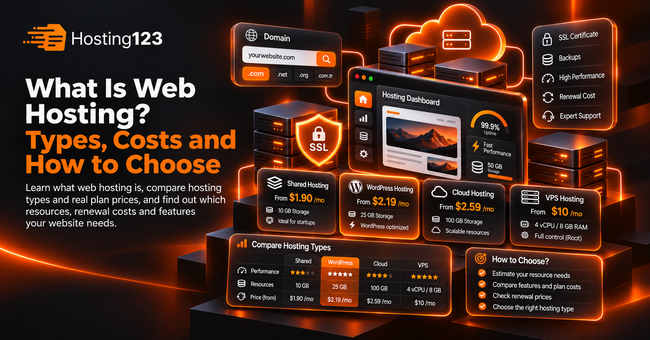
Here are examples from Hosting123’s English website:
| Plan | Website allowance | NVMe storage | RAM limit | Advertised starting price |
|---|---|---|---|---|
| StartUp | 1 | 10 GB | 2 GB | $1.90/month |
| Super Grow | 10 | 25 GB | 2 GB | $2.19/month |
| Unicorn | 100 | 40 GB | 2 GB | $2.59/month |
| PRO Cloud S | 1 | 20 GB | 4 GB | $2.59/month |
Prices checked on November 2, 2026. These are advertised starting prices in USD. Confirm the qualifying billing term, taxes, total payment and renewal rate at checkout. Prices may change.
The comparison shows why price alone can mislead. Unicorn and PRO Cloud S share the same advertised starting price, but they serve different needs: one offers more website slots, while the other offers more memory for a single website.
Also, multiple website slots do not mean each site receives its own full RAM allocation. Confirm how the provider applies account limits.
Which resources matter most?
Storage determines how much data your account can hold. CPU and memory help your applications process work. Other limits, such as disk throughput or concurrent processes, can also affect performance. Therefore, match the plan to your application and workload rather than using website count as a shortcut.
Consider three situations:
A new portfolio: You may need only one website slot and modest storage. Clear content and optimized images may matter more than a larger package.
Several small client websites: More website slots can help. However, their combined workload still needs to fit within the account’s resource limits.
A busy WordPress store: Product searches, uncached pages and checkout activity may increase resource use. Review actual usage before selecting an upgrade.
There is no reliable visitor limit that applies to every website. Cached articles and personalized shopping sessions place different demands on a server.
When should you upgrade your hosting?
Upgrade when measurements show that your current plan cannot comfortably support the workload. Repeated resource-limit events, growing storage use or additional websites can justify a change. However, first investigate inefficient plugins, oversized images and application errors, because a bigger package may not fix those problems.
Also, check what the upgrade actually increases.
Moving to another plan might add storage and website slots without adding CPU or memory. If memory is the bottleneck, compare the RAM allowance specifically.
You can review Premium hosting options when your project needs more resources. Share your current usage with support so the recommendation addresses the actual limitation.
What should you check before buying?
Start with your website’s software and expected workload. Then check ongoing costs, backups and support responsibilities. Finally, confirm how you can leave or upgrade the service. These details affect the experience long after the introductory offer ends.
Use this checklist:
- Application compatibility: Confirm required software versions and features.
- Resource limits: Check CPU, RAM, storage and other relevant restrictions.
- Billing: Review the initial payment, renewal cost and optional extras.
- Backups: Ask about frequency, retention and restoration.
- Security responsibilities: Understand which tasks belong to you.
- Support scope: Distinguish hosting support from website development.
- Migration: Confirm what the provider can transfer and what you must prepare.
If you are moving an active store, plan how to handle new orders during the transfer. Keep the old service available until you have tested the new setup.
How do you get started?
Choose your domain, select a compatible hosting plan and connect the two through DNS. Next, install your website software or upload your files. Before launch, test HTTPS, forms, email and mobile pages. After launch, monitor updates, backups and renewal dates.
For a first WordPress project, compare Hosting123’s WordPress hosting plans. Start with the resources your website needs, then review usage as it grows.
Frequently asked questions
Does a Website Builder Replace Web Hosting?
A hosted website builder usually includes hosting in its subscription. Therefore, you do not need to buy or manage hosting separately. However, your website still relies on hosting infrastructure. Check the platform’s limits, domain options, and export features before choosing it.
Does Free SSL Make My Whole Website Secure?
No. HTTPS protects the connection between the browser and server. However, you still need secure accounts, updated software, and reliable backups. In addition, an SSL certificate cannot fix vulnerabilities in themes or plugins.
Can I Move My Website to Another Hosting Company?
Usually, yes. The process depends on your website software and your access to files, databases, and email accounts. However, some hosted platforms limit exports. Therefore, check the platform’s migration options before building your website.
Does Server Location Matter for International Visitors?
Server location can affect network latency. However, caching, CDN coverage, and application performance also influence loading speed. Therefore, test your website from your main audience locations instead of choosing solely by the provider’s business address.
What Happens If I Stop Paying for Hosting?
The provider may suspend your hosting service. Later, it may delete your data according to its terms. Therefore, do not assume the provider will keep your files indefinitely. Maintain an independent backup and track hosting and domain renewals separately.