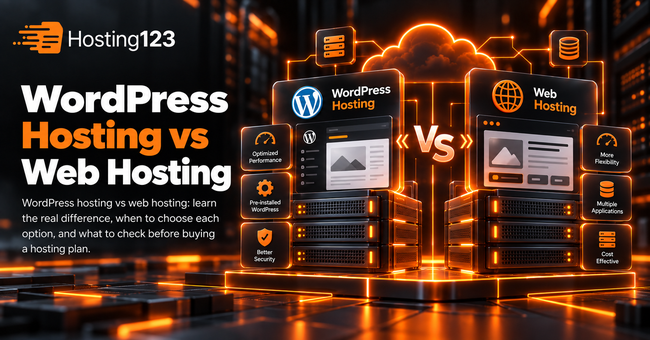
WordPress hosting vs web hosting comes down to focus. Web hosting can run many website types, while WordPress hosting focuses on WordPress speed, PHP settings, caching, security, backups and support. Hosting123 recommends choosing based on your website platform, traffic, plugins and growth plans.
Quick Answer: WordPress Hosting vs Web Hosting
Web hosting gives you general server space for websites, files, databases and email.
However, WordPress hosting gives you an environment built around WordPress needs. It usually includes better PHP compatibility, easier WordPress management, caching support, SSL, backups and WordPress-focused technical help.
So, if your website runs on WordPress, WordPress hosting usually gives you a better fit.
WordPress Hosting vs Web Hosting: Main Difference
The main difference is purpose.
Web hosting works for different website types, including HTML sites, PHP scripts, CMS platforms and small business websites.
WordPress hosting, on the other hand, focuses on WordPress websites. Therefore, it can offer a smoother setup, better performance settings and more relevant support for WordPress users.
| Feature | Web hosting | WordPress hosting |
|---|---|---|
| Main use | General websites | WordPress websites |
| Setup | Manual or flexible | WordPress-focused |
| Performance | Depends on package | Optimized for WordPress |
| Caching | May need manual setup | Often easier to manage |
| Support | General hosting support | WordPress-focused support |
| Best for | Mixed website types | Blogs, business sites, WooCommerce |
| Upgrade path | General hosting upgrades | WordPress growth needs |
This table gives a quick overview. However, your website size, plugins and traffic still matter.
1. Web Hosting Works for Many Website Types
Web hosting gives you a flexible environment.
For example, you can host static HTML pages, PHP scripts, small business websites, landing pages or different CMS platforms.
Because of that, web hosting works well when you want general hosting space and do not need WordPress-specific tools.
However, flexibility can also mean more manual work. You may need to install WordPress, adjust PHP settings, set up cache and handle more details yourself.
For general projects, you can review Hosting123’s web hosting plans.
2. WordPress Hosting Focuses on WordPress Performance
WordPress hosting focuses on websites built with WordPress.
It can help with PHP compatibility, cache settings, database performance, SSL, backups and WordPress-related support.
Also, WordPress sites often use themes, plugins, page builders and forms. These tools can increase resource usage.
Therefore, a WordPress-focused hosting plan can make daily management easier.
For WordPress websites, review Hosting123’s WordPress Hosting plans before choosing a general package.
3. Plugins Can Change Your Hosting Needs
A small WordPress blog may run well on a basic plan.
However, plugins can quickly change the situation. Page builders, security plugins, SEO tools, backup plugins, forms and WooCommerce can all increase server load.
Because of that, you should not compare hosting plans only by price.
Instead, check CPU, RAM, PHP version, database performance, cache support and backup options.
This approach helps you avoid slow pages, dashboard delays and checkout problems.
4. WooCommerce Usually Needs Stronger Hosting
WooCommerce turns WordPress into an online store.
As a result, your website handles product pages, carts, checkout, customer accounts, order emails and payment processes.
That extra activity needs more stable hosting.
For this reason, WooCommerce sites usually benefit from WordPress hosting with stronger resources, better backups and faster support.
Also, campaign periods can increase traffic quickly. So, check upgrade options before your store grows.
5. Support Quality Matters More Than It Seems
Support quality can change the real value of your hosting plan.
For example, a general hosting team may help with server access, SSL or email issues. However, a WordPress-focused support team can better understand plugin conflicts, PHP errors, cache problems and WordPress migration needs.
Therefore, compare support scope before you buy.
Ask these questions:
- Do you help with WordPress setup?
- Can you help with SSL?
- Do you support PHP version changes?
- Can you check basic WordPress errors?
- Do you help with migration?
- Can I upgrade the plan later?
These questions help you choose a plan with fewer surprises.
6. Migration Can Affect Your Final Decision
If you already have a WordPress website, migration matters.
Before switching hosting providers, check whether the new company can help with files, database, DNS, SSL and email settings.
A smooth migration can reduce downtime risk and save time.
For this reason, you can review Hosting123’s free website migration service before moving your website.
Also, create a full backup before any transfer. Then test the website after migration.
WordPress Hosting vs Web Hosting Checklist
Use this checklist before choosing a hosting plan:
- Define your website platform.
- Check whether your site runs on WordPress.
- List your plugins and theme.
- Estimate monthly traffic.
- Check PHP version support.
- Compare CPU and RAM limits.
- Review cache support.
- Confirm SSL availability.
- Check backup frequency.
- Ask about WordPress support.
- Review migration help.
- Compare upgrade options.
This checklist helps you choose based on real needs, not only price.
When Should You Choose Web Hosting?
Choose web hosting when you need a flexible and general hosting plan.
It works well for:
- Static websites
- Small PHP websites
- Landing pages
- Simple business websites
- Non-WordPress CMS projects
- Mixed website experiments
However, if your website depends heavily on WordPress plugins, themes or WooCommerce, compare WordPress hosting before you decide.
When Should You Choose WordPress Hosting?
Choose WordPress hosting when your website runs on WordPress and you want easier management.
It works well for:
- WordPress blogs
- Business websites
- Portfolio websites
- Plugin-heavy websites
- WooCommerce stores
- Growing content sites
Also, WordPress hosting makes more sense when you want support that understands WordPress-specific problems.
Final Decision: Which One Should You Choose?
Choose web hosting if you need a flexible plan for a simple or non-WordPress website.
However, choose WordPress hosting if your website runs on WordPress, uses several plugins, needs better caching or depends on WooCommerce.
In short, web hosting gives you general flexibility. WordPress hosting gives you a more focused environment for WordPress speed, security, backups and support.
Frequently Asked Questions
What is the difference between WordPress hosting and web hosting?
Web hosting works for many website types. WordPress hosting focuses on WordPress websites and usually offers better WordPress performance, caching, PHP compatibility, backups and support.
Do I need WordPress hosting for a WordPress site?
You do not always need WordPress hosting. However, WordPress hosting can make more sense if your site uses many plugins, WooCommerce, page builders or regular traffic.
Is WordPress hosting faster than regular web hosting?
WordPress hosting can perform better for WordPress sites when it includes proper caching, PHP settings, SSD or NVMe storage, backups and WordPress-focused support.
Can I move my WordPress site to another host?
Yes. You can move your WordPress files, database, SSL settings, DNS records and email settings to another host. A planned migration helps reduce downtime risk.