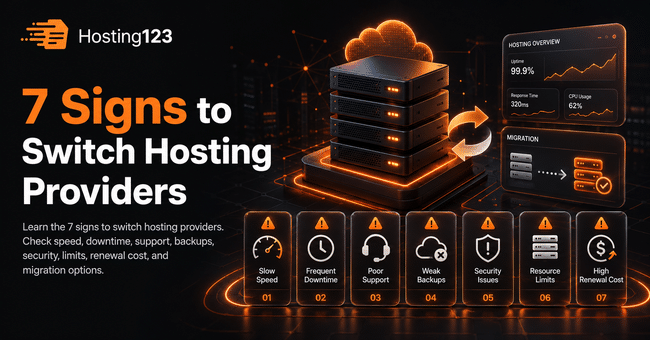
Signs to switch hosting usually appear when your website gets slower, support takes too long, backups feel unclear, or your current plan limits growth. Hosting123 recommends reviewing speed, uptime, security, support, renewal cost, and migration options before you renew or upgrade with the same provider.
Quick Answer: When Should You Switch Hosting Providers?
You should consider switching hosting providers when your website slows down often, goes offline repeatedly, or receives poor technical support.
However, do not decide based on one bad day. First, check performance, support history, backup policy, and renewal cost.
In short, switch when your hosting provider starts hurting speed, trust, sales, or growth.
Why Hosting Quality Matters
Your hosting provider affects more than server space.
It impacts website speed, user experience, email reliability, security, backups, and business continuity.
For example, a slow website can make visitors leave before they contact you. Likewise, poor support can turn a simple issue into hours of stress.
Therefore, treat hosting as part of your business infrastructure, not just a yearly expense.
7 Signs to Switch Hosting Providers
Use the table below as a quick decision guide.
| Sign | What it means | What you should do |
|---|---|---|
| Your website loads slowly | Server resources may be weak | Test speed and compare alternatives |
| Downtime happens often | Uptime may not be stable | Review logs and consider migration |
| Support responds late | Help may not be reliable | Check support quality before renewal |
| Backups are unclear | Your data may be at risk | Ask for backup details in writing |
| Security feels weak | Your site may face higher risk | Review SSL, malware, and firewall options |
| Resource limits keep blocking you | Your website may have outgrown the plan | Upgrade or switch providers |
| Renewal price jumps too much | The real cost may be higher than expected | Compare value, not only price |
This table helps you make a practical decision. As a result, you avoid renewing a service that no longer supports your website properly.
1. Your Website Loads Slowly
Slow loading is one of the strongest signs to switch hosting.
A website may slow down because of images, plugins, themes, or poor optimization. However, hosting also plays a major role.
If your pages load slowly even after basic optimization, your server resources may not be enough.
Check these pages first:
- Homepage
- Main service page
- Product page
- Checkout page
- Contact page
- Blog article page
Then test your site on mobile. Mobile users often feel speed problems faster.
If slow speed continues, compare stronger hosting options before your next renewal.
2. Your Website Goes Offline Too Often
Occasional technical issues can happen. However, repeated downtime creates a serious problem.
When your site goes offline, visitors cannot reach your content, products, forms, or contact details.
In addition, downtime can hurt customer trust. For e-commerce websites, it may also cause direct sales loss.
Track these details:
- How often the site goes offline
- How long each issue lasts
- What your provider says about the cause
- How fast support responds
- Whether the same issue repeats
If downtime becomes a pattern, do not ignore it. Instead, plan a safer migration before the next major problem.
3. Support Takes Too Long to Respond
Good support becomes critical when something breaks.
If your provider responds late, gives unclear answers, or avoids responsibility, your business takes the risk.
A hosting company should help you understand the problem. It should also guide you toward a clear solution.
Before switching, review your support history:
- Did they answer quickly?
- Did they solve the issue?
- Did they explain the cause?
- Did they offer prevention steps?
- Did they treat urgent problems seriously?
If the answer is usually “no,” your hosting provider may no longer fit your needs.
4. Backup Policy Is Not Clear
Backups protect your website when something goes wrong.
A plugin update can break WordPress. A user mistake can delete content. Malware can damage files. Therefore, clear backups matter.
Ask your provider these questions:
| Backup question | Why it matters |
|---|---|
| How often do you take backups? | Recent backups reduce data loss |
| How long do you keep backups? | Older restore points give more flexibility |
| Can I restore backups easily? | Easy restore saves time during emergencies |
| Are email backups included? | Business communication stays safer |
| Does restore support cost extra? | Hidden fees can increase total cost |
A provider that cannot explain backups clearly may put your data at risk.
Therefore, backup uncertainty is a strong reason to review other hosting options.
5. Security Features Feel Too Basic
Security should not depend only on luck.
Your hosting provider should offer a secure environment for your website, control panel, files, email, and database.
At minimum, check these areas:
- SSL certificate
- Secure panel access
- Updated PHP versions
- Malware scanning
- Firewall protection
- DDoS protection
- Regular backups
In addition, keep your WordPress themes and plugins updated. Hosting security and website maintenance should work together.
If your provider does not support basic security needs, compare safer hosting plans.
6. Your Website Has Outgrown the Current Plan
A hosting plan that worked last year may not work today.
Your website may now have more traffic, more images, more plugins, more products, or more email accounts.
As a result, your current plan may start limiting performance.
Common growth signs include:
- CPU usage reaches the limit often.
- RAM usage stays high.
- Disk space fills quickly.
- Inode limits create warnings.
- Traffic limit becomes too tight.
- WordPress admin panel slows down.
- WooCommerce checkout becomes unstable.
If your website keeps hitting limits, do not only delete files or disable features. Instead, choose a plan that matches your growth.
7. Renewal Price No Longer Matches the Value
Hosting renewal price matters.
A plan may look affordable during the first year. Later, the renewal price may rise. That is not always bad, but the value should still make sense.
Before you renew, compare what you pay with what you receive.
Check these cost areas:
| Cost area | What to compare |
|---|---|
| Renewal price | Compare it with the first-year price |
| Backup cost | Check whether backups cost extra |
| SSL cost | Confirm whether SSL comes included |
| Email cost | Review mailbox limits and extra fees |
| Migration cost | Check whether transfer support is free |
| Upgrade cost | Learn the cost of moving to a stronger plan |
| Support value | Compare response speed and solution quality |
If the price increased but service quality stayed weak, switching may be the better decision.
Hosting Switch Checklist
Before you move your website, complete this checklist.
- Test your website speed.
- Review downtime history.
- Check support response quality.
- Confirm backup availability.
- Download a fresh backup.
- Review email accounts.
- List DNS records.
- Check SSL status.
- Compare renewal and migration costs.
- Choose a provider with clear migration support.
This checklist helps you avoid rushed decisions. Also, it reduces the risk of mistakes during migration.
What Should You Check Before Migration?
Website migration needs planning. Otherwise, you may face missing files, email problems, DNS delays, or SSL issues.
Before moving your website, prepare these items:
- Website files
- Database
- Email accounts
- DNS records
- SSL settings
- Backup files
- PHP version
- Cron jobs
- WordPress admin access
- Hosting panel access
In addition, choose a low-traffic time for the migration. Then test the website after the move.
If you already have a website, Hosting123’s free website migration service can help you plan a safer transition.
WordPress Users Should Be Extra Careful
WordPress websites can become heavy over time.
Themes, plugins, page builders, WooCommerce, image galleries, forms, and multilingual tools all increase resource usage.
Therefore, WordPress users should monitor performance more closely.
If your WordPress dashboard feels slow, checkout becomes unstable, or plugin updates often create issues, your hosting plan may need an upgrade.
For WordPress-based websites, you can review Hosting123’s WordPress Hosting plans.
Final Decision: Should You Switch Hosting Providers?
You do not need to switch hosting providers after every small issue.
However, repeated speed problems, downtime, poor support, unclear backups, weak security, tight limits, and high renewal costs deserve attention.
First, review the last few months of website performance. Then compare your current provider with better options.
If your hosting provider slows down your website or creates risk for your business, switching can become the smarter move.
Frequently Asked Questions
What are the main signs to switch hosting?
The main signs to switch hosting include slow website speed, repeated downtime, poor support, unclear backups, weak security, resource limits, and high renewal costs.
Should I switch hosting if my website is slow?
You should first optimize images, plugins, cache, and theme settings. However, if your website stays slow after optimization, your hosting plan may be the problem.
Can switching hosting hurt my website?
A planned migration should not hurt your website. Before switching, take a fresh backup, check DNS records, test SSL, and confirm email settings.
When is the best time to switch hosting providers?
The best time to switch is before renewal, before a major campaign, or after repeated performance issues. Also choose a low-traffic time for migration.