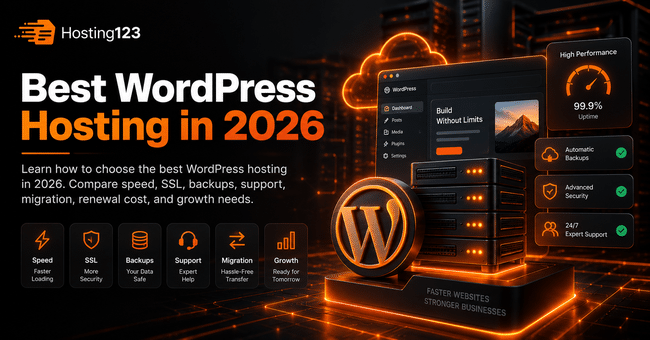
The best WordPress hosting gives your website fast loading, stable uptime, easy backups, strong security, and helpful support. Hosting123 recommends choosing a plan based on real needs, not only price. Therefore, compare speed, LiteSpeed, SSL, PHP support, migration help, and renewal cost before buying.
Quick Answer: How Do You Choose the Best WordPress Hosting?
Choose WordPress hosting that gives you speed, security, backups, easy management, and fast support.
However, do not focus only on the cheapest price. A weak hosting plan can slow down your website and create problems later.
In short, the best WordPress hosting should match your traffic, plugins, content plan, and growth goals.
What Is WordPress Hosting?
WordPress hosting is a hosting service optimized for WordPress websites.
It usually supports WordPress installation, PHP, databases, SSL, email, cache tools, and control panel access.
In addition, a good WordPress hosting plan should help your website run faster and stay safer.
For example, blogs, business websites, landing pages, portfolios, and WooCommerce stores can all use WordPress hosting.
Why WordPress Hosting Matters in 2026
WordPress websites now need more than basic hosting.
Themes, plugins, page builders, images, forms, and WooCommerce features can increase resource usage quickly.
Therefore, your hosting plan directly affects speed, user experience, SEO, and conversion.
If your website loads slowly, visitors leave faster. As a result, you may lose traffic, leads, and sales.
Best WordPress Hosting Checklist
Use this checklist before choosing a WordPress hosting plan.
| Checklist item | Why it matters | What to check |
|---|---|---|
| Speed | Improves user experience | LiteSpeed, cache, SSD or NVMe |
| Security | Protects your website | SSL, malware scanning, secure panel |
| Backups | Reduces data loss risk | Backup frequency and restore process |
| Support | Saves time during problems | Fast and WordPress-aware support |
| PHP support | Affects compatibility | Current PHP versions |
| Resources | Supports growth | CPU, RAM, inode, traffic limits |
| Migration | Makes switching easier | Free or assisted migration |
| Renewal cost | Shows real budget | First-year and renewal price |
This table helps you compare plans more clearly. As a result, you avoid choosing a package only because it looks cheap.
1. Start with Your Website Type
Every WordPress website has different hosting needs.
A small blog does not need the same resources as a WooCommerce store. Likewise, a business website with many forms and landing pages may need more stability than a simple portfolio.
First, define your website type. Then choose your hosting plan around that need.
| Website type | Hosting priority |
|---|---|
| Personal blog | Affordable start and easy management |
| Business website | Speed, email, security, and support |
| Portfolio website | Clean performance and simple control |
| Content-heavy blog | Storage, cache, and traffic capacity |
| WooCommerce store | CPU, RAM, backups, and stable checkout |
| Agency website | Reliability, support, and growth room |
This step keeps your decision practical. Also, it prevents you from buying too little or too much.
2. Check Server Speed and Cache Support
Speed should be one of your first checks.
A good WordPress hosting plan should support fast server response, modern storage, and effective caching.
Look for these features:
- LiteSpeed support
- SSD or NVMe storage
- Server-side cache options
- Current PHP versions
- Database performance
- Optimized WordPress setup
However, do not trust only marketing claims. After setup, test your homepage and important pages.
In addition, test on mobile. Mobile visitors often feel slow hosting problems faster.
3. Review Resource Limits Carefully
Many hosting plans look similar at first glance. Yet resource limits can create big differences.
Check CPU, RAM, disk space, inode usage, database limits, and traffic capacity before buying.
For a small WordPress site, entry-level resources may work well. However, plugin-heavy sites need more room.
WooCommerce stores need even more care. Product pages, carts, checkout steps, and customer accounts use extra resources.
Therefore, choose a plan that fits today and leaves room for growth.
4. Do Not Ignore Backups
Backups protect your website when something goes wrong.
A plugin update may break your site. A theme change may create layout problems. In worse cases, malware or user mistakes can damage data.
Because of that, backup policy matters a lot.
Ask these questions before buying:
| Backup question | Why you should ask |
|---|---|
| How often do you take backups? | Recent backups reduce data loss |
| How long do you keep backups? | Older restore points give more flexibility |
| Can I restore backups easily? | Fast restore saves time |
| Are email backups included? | Business communication stays safer |
| Is restore support free? | Extra fees can increase cost |
A clear backup policy builds trust. On the other hand, vague backup promises can create risk.
5. Check Security Features
Security should not start after a problem happens.
Your WordPress hosting plan should support safe access, SSL, updated software, and basic server protection.
Check these security areas:
- Free SSL certificate
- Secure control panel access
- Malware scanning
- Firewall protection
- DDoS protection
- Updated PHP versions
- Regular backups
In addition, keep your themes and plugins updated. Hosting security works better when website maintenance also stays clean.
6. Evaluate Support Quality
Support can make or break your hosting experience.
When your WordPress site has an issue, you need clear and fast help. Slow support can cost you time, traffic, and customers.
Before choosing a provider, check support channels. For example, ticket, live chat, WhatsApp, or phone support can help different users.
Also, ask what support includes. Some providers only help with server access. Others can guide you on WordPress migration, email setup, SSL, backups, and performance issues.
As a result, good support adds real value to your hosting plan.
7. Compare First-Year and Renewal Prices
The cheapest first-year price can be misleading.
Some hosting plans start with a low discount. Later, the renewal price may increase.
Therefore, compare both prices before buying. Also check whether SSL, backups, email, and migration come with the plan.
Use this simple cost view:
| Cost item | Check before buying |
|---|---|
| First-year hosting price | Shows starting cost |
| Renewal price | Shows long-term cost |
| SSL cost | Should not surprise you later |
| Backup cost | Affects protection budget |
| Email cost | Matters for business websites |
| Migration cost | Matters if you already have a site |
| Upgrade cost | Shows future growth budget |
This comparison gives you the real cost. Thus, you avoid choosing a plan based only on the checkout price.
8. Think About Migration Before You Buy
Migration matters if you already have a WordPress website.
A wrong migration can create downtime, missing files, database errors, email issues, or DNS problems.
Before switching providers, check whether the hosting company offers migration help.
If you already have a website, Hosting123’s free website migration service can help you move your WordPress site more safely.
9. Match Hosting with Your Growth Plan
Your WordPress website may start small. Still, your needs can grow quickly.
You may add more blog posts, landing pages, images, forms, plugins, or WooCommerce products.
Therefore, choose a hosting plan that can grow with you.
Ask this simple question:
Will this hosting plan still support my website six months from now?
If the answer feels uncertain, review a stronger plan.
For a WordPress-focused start, you can review Hosting123’s WordPress Hosting plans.
10. Check Whether VPS or VDS Makes More Sense Later
Most WordPress websites can start with WordPress hosting.
However, larger sites may later need more control and stronger resources.
For example, high-traffic blogs, busy WooCommerce stores, membership websites, and custom WordPress projects may outgrow basic hosting.
In that case, VPS or VDS can become a better option.
You can review Hosting123’s VDS server packages when your project needs more stable resources.
WordPress Hosting Decision Table
The table below helps you choose faster.
| Your situation | Best hosting direction |
|---|---|
| New WordPress blog | Start with WordPress hosting |
| Small business website | Choose WordPress hosting with support |
| Growing content website | Pick more storage and better cache |
| WooCommerce store | Choose stronger resources |
| High-traffic website | Consider VPS or VDS |
| Existing site on slow hosting | Check migration support |
| Limited technical knowledge | Choose managed support options |
This table gives you a practical starting point. Nevertheless, always compare your real traffic and resource needs.
Final Decision: What Makes the Best WordPress Hosting?
The best WordPress hosting is not always the cheapest plan.
Instead, it gives you the right balance of speed, security, backups, support, and growth room.
First, define your website type. Then compare resources, backup policy, support quality, and renewal cost.
If your website supports your business, choose value over the lowest price. In conclusion, good WordPress hosting should help your website stay fast, safe, and ready to grow.
Frequently Asked Questions
What is the best WordPress hosting?
The best WordPress hosting gives your website fast loading, reliable resources, SSL, backups, security features, and helpful support. It should also match your traffic, plugins, and growth plans.
How do I choose WordPress hosting?
Start with your website type. Then compare speed, storage, PHP support, backups, security, support quality, migration help, and renewal price before choosing a plan.
Is cheap WordPress hosting enough?
Cheap WordPress hosting can be enough for small blogs and simple websites. However, growing business websites, WooCommerce stores, and plugin-heavy sites usually need stronger hosting.
When should I upgrade WordPress hosting?
Upgrade when your website slows down, traffic grows, resource limits fill up, or WooCommerce checkout becomes unstable. Also consider upgrading before major campaigns.