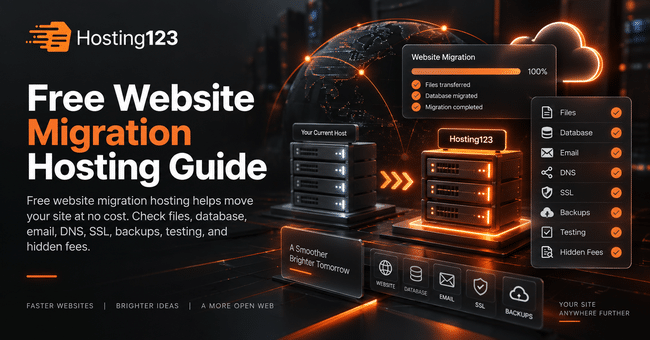
Free website migration hosting helps you move your existing website to a new provider without paying extra transfer fees. Hosting123 recommends checking migration scope, backups, email transfer, DNS support, SSL setup, and post-migration testing before choosing a provider. This way, you reduce downtime risk and avoid hidden costs.
Quick Answer: What Is Free Website Migration Hosting?
Free website migration hosting means the provider helps move your website from your old hosting account to the new one at no extra cost.
However, not every free migration service covers the same tasks. Some providers move only website files. Others also help with databases, email, SSL, and DNS.
In short, free migration is valuable when the scope is clear.
Why Free Website Migration Matters
Website migration can feel risky for many site owners.
Files, databases, emails, DNS records, SSL settings, and WordPress configurations all need attention. If one step goes wrong, your website may face errors or downtime.
Therefore, migration support can save time and reduce stress.
For business websites, this support matters even more. A broken contact form, missing email account, or failed checkout page can cost real customers.
What Does a Free Migration Service Usually Include?
A free migration service often covers the main website transfer process.
Still, you should check the details before buying a hosting plan. The word “free” does not always mean “full migration.”
| Migration area | What to check |
|---|---|
| Website files | Does the provider move all site files? |
| Database | Does the provider transfer WordPress data? |
| Email accounts | Are business emails included? |
| DNS records | Does the provider guide DNS changes? |
| SSL setup | Does the provider activate SSL after migration? |
| Testing | Does the provider test the site after transfer? |
| Downtime planning | Does the provider choose a safer migration time? |
This table helps you compare providers clearly. As a result, you avoid surprise limits during migration.
Free Website Migration Hosting Checklist
Use this checklist before choosing a hosting provider.
| Checklist item | Why it matters | What to ask |
|---|---|---|
| Migration scope | Shows what the provider will move | “Do you move files, database, and email?” |
| Backup policy | Protects your data | “Do you take a backup before migration?” |
| WordPress support | Reduces technical errors | “Do you handle WordPress migration?” |
| Email transfer | Protects business communication | “Do you migrate mailboxes?” |
| DNS guidance | Reduces downtime risk | “Do you help with DNS records?” |
| SSL setup | Keeps secure access active | “Do you activate SSL after migration?” |
| Final testing | Confirms the site works | “Do you test forms, pages, and login?” |
| Extra fees | Reveals hidden cost | “Which migration tasks cost extra?” |
This checklist gives you a practical decision framework. Also, it makes the service easier to compare.
1. Check What “Free Migration” Really Covers
The first step is simple. Ask exactly what the provider includes in the free migration service.
Some providers move only one website. Others may limit database size, email transfer, or special configurations.
For this reason, do not rely only on the phrase “free migration.” Instead, ask for the scope in writing.
A clear answer should explain the number of websites, included files, database transfer, email support, DNS guidance, and SSL setup.
2. Confirm WordPress Migration Support
WordPress migration needs careful handling.
Your provider should move website files and the database together. Otherwise, pages, posts, images, plugins, or settings may break.
In addition, WordPress sites often use cache plugins, security tools, contact forms, and page builders. These parts need testing after migration.
If your website runs on WordPress, choose a provider that understands WordPress structure.
For WordPress-focused websites, you can review Hosting123’s WordPress Hosting plans.
3. Ask About Email Migration
Many website owners forget email during migration.
However, business email can be as important as the website itself. Addresses such as [email protected], [email protected], and [email protected] may contain important conversations.
Before switching providers, ask whether email accounts are included.
Also check mailbox size, old email transfer, spam settings, and mobile setup. This step helps you avoid communication problems after migration.
4. Review DNS and Domain Support
DNS controls where your website and email services point.
A migration can fail even when files move correctly if DNS records are wrong. Therefore, DNS guidance matters.
Ask your new provider whether they help with A records, MX records, CNAME records, TXT records, SPF, DKIM, and DMARC settings.
In addition, plan the timing carefully. DNS changes can take time to spread, so you should avoid rushed changes during busy business hours.
5. Check SSL After Migration
SSL keeps your website connection secure.
After migration, your website should load with HTTPS without browser warnings. If SSL fails, visitors may see security alerts.
That can damage trust quickly.
Therefore, ask whether the provider activates SSL after migration. Also test important pages after the move.
Check these pages first:
- Homepage
- Contact page
- Login page
- Checkout page
- Product page
- Main service page
This small test helps you catch problems early.
6. Understand Possible Hidden Costs
Free migration can still include limits.
For example, a provider may move one website for free but charge for extra websites. Another provider may exclude email transfer or complex custom setups.
Before buying, ask about these possible costs:
- Extra website migration
- Large database transfer
- Email mailbox migration
- Malware cleanup
- Custom server configuration
- Emergency migration
- Post-migration technical work
This way, you know the real cost before you start.
7. Test the Website After Migration
Migration does not end when files move.
After transfer, you should test the website carefully. This step confirms that the new hosting environment works properly.
Review these areas:
- Homepage layout
- Menu links
- Contact forms
- Blog posts
- Images
- Admin login
- Email sending
- SSL status
- Mobile view
- Checkout process
As a result, you can fix small issues before visitors notice them.
When Should You Use Free Migration Hosting?
Free migration hosting makes sense when you already have a live website and want to change providers.
It becomes especially useful if your current hosting is slow, support is weak, renewal cost is high, or your website has outgrown the plan.
You should consider free migration hosting when:
- Your website loads slowly.
- Your hosting support responds late.
- Your renewal price increased.
- Your current package has tight limits.
- Your WordPress site needs stronger performance.
- Your business email must keep working.
- You want to reduce migration stress.
This list works as a quick decision tool. Moreover, it helps you decide before renewal time.
Free Migration vs Paid Migration
Free migration can be enough for many standard websites. However, paid migration may make sense for complex projects.
| Migration type | Best for | What to expect |
|---|---|---|
| Free migration | Standard WordPress and business sites | Basic transfer and setup help |
| Paid migration | Large or complex websites | More detailed technical work |
| Emergency migration | Broken or urgent websites | Faster action and extra care |
| Managed migration | Business-critical websites | Planning, testing, and support |
The best option depends on website complexity. Nevertheless, a clear free migration service can solve most standard transfer needs.
How Hosting123 Helps with Website Migration
Hosting123 offers a practical path for users who want to move their websites with less stress.
If you already have a website, Hosting123’s free website migration service can help you plan a safer transfer.
For growing WordPress projects, Hosting123’s WordPress Hosting plans may offer a more suitable setup.
Final Decision: Is Free Migration Hosting Worth It?
Free website migration hosting is worth it when the provider gives clear scope, careful transfer, DNS guidance, SSL setup, and final testing.
However, you should not choose a provider only because migration is free. First, check speed, support, backups, security, and renewal cost.
If the hosting plan also matches your website needs, free migration becomes a strong advantage.
In conclusion, the best free migration service does more than move files. It helps your website continue working smoothly after the switch.
Frequently Asked Questions
What is free website migration hosting?
Free website migration hosting means the provider helps move your existing website to a new hosting account without charging an extra migration fee.
Does free migration include email accounts?
Not always. Some providers include email migration, while others only move website files and databases. Always ask about email accounts before switching.
Can website migration cause downtime?
Migration can cause downtime if DNS, files, databases, or SSL settings are handled poorly. However, careful planning and testing can reduce this risk.
Should I choose hosting only because migration is free?
No. Free migration is helpful, but you should also compare speed, backups, security, support quality, renewal price, and upgrade options.