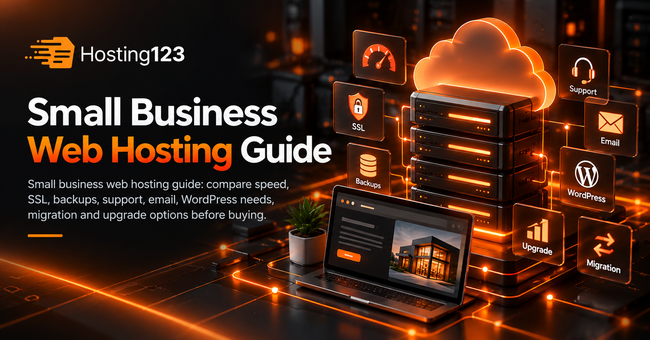
Small business web hosting should give your website enough speed, security, backups, email support, SSL, easy management, and room to grow. Hosting123 recommends choosing a plan based on your website type, traffic, support needs, and long-term cost rather than picking the cheapest monthly price.
Quick Answer: How Should a Small Business Choose Web Hosting?
A small business should choose web hosting by checking performance, uptime, SSL, backups, support quality, email needs, storage, renewal price, and upgrade options.
A simple business website can start with shared hosting. However, a WordPress site, online store, or lead-generation website may need stronger resources and better support.
Why Small Business Web Hosting Matters
Your website often creates the first impression for your business.
If pages load slowly, visitors may leave before they contact you. Also, if your website goes offline, you can lose leads, sales, bookings, and trust.
Therefore, hosting is not only a technical choice. It directly affects marketing, customer experience, and daily business operations.
Small Business Web Hosting Comparison Table
Use this table before choosing a hosting plan.
| Feature | Why it matters | What to check |
|---|---|---|
| Speed | Helps visitors browse faster | SSD/NVMe storage and caching |
| SSL | Builds trust and protects data | Free SSL included or not |
| Backups | Reduces data loss risk | Daily or regular backups |
| Support | Saves time during problems | Fast technical response |
| Supports business communication | Business email accounts | |
| Storage | Holds files, images, and emails | Disk limits and inode limits |
| WordPress support | Helps site management | PHP, cache, and plugin support |
| Upgrade path | Supports growth | Easy plan upgrades |
This table gives a quick starting point. However, your final choice should match your website type and business goals.
1. Start With Your Website Type
First, define what kind of website your business needs.
A local service website may only need a homepage, service pages, contact form, and blog. In contrast, an online store needs product pages, carts, checkout, payment systems, and stronger security.
For example, a consultant, dentist, restaurant, real estate agency, or small law office can often start with a reliable shared hosting plan.
However, a growing WordPress site or WooCommerce store needs more resources.
So, write down your website type before you compare prices.
2. Do Not Choose Hosting by Price Alone
Low-cost hosting can work for a small website.
However, the cheapest plan may create problems if it gives weak support, limited backups, slow speed, or low resource limits.
Because of that, compare value instead of price alone.
Ask these questions before buying:
- Does the plan include SSL?
- Does it include regular backups?
- Can I use business email?
- Does support answer quickly?
- Can I upgrade later?
- Does the renewal price stay clear?
- Can the plan handle my website traffic?
These questions help you avoid hidden costs and weak plans.
3. Check Speed and Server Resources
Speed matters for every small business website.
Fast pages help visitors move through your site more easily. Also, faster websites usually create a better user experience.
Before choosing a hosting plan, check storage type, CPU, RAM, PHP support, caching options, and database performance.
| Website type | Suggested starting point | Best fit |
|---|---|---|
| Simple business site | Shared hosting | Local service pages |
| WordPress site | WordPress hosting | Blogs and company websites |
| Portfolio site | Shared hosting | Freelancers and creatives |
| Lead-generation site | WordPress hosting | Forms, landing pages, content |
| Small online store | WooCommerce hosting | Products, cart, checkout |
| Growing business site | Higher-resource plan | More traffic and content |
This table does not set a strict rule. Still, it helps you choose a better starting plan.
4. Make Sure SSL Comes Included
SSL protects data between your website and the visitor’s browser.
Small business websites need SSL because visitors expect a secure connection, especially on contact forms, login pages, and checkout pages.
Also, browsers can mark websites without SSL as unsafe. That warning can reduce trust.
Therefore, check SSL before you buy hosting.
A good small business hosting plan should include SSL setup or make SSL easy to activate.
5. Review Backup and Restore Options
Backups protect your business from mistakes, updates, malware, and technical errors.
For example, a plugin update can break your website. Also, someone may delete an important page by accident.
Because of that, backups matter even for small websites.
Before choosing hosting, ask:
- How often do you take backups?
- Do backups include files and databases?
- How long do you keep backups?
- Can I restore a backup quickly?
- Do you charge extra for restore help?
These answers show how safe your website really is.
6. Check Support Quality Before You Need It
Support quality can make a big difference for small businesses.
You may not have an in-house developer. Therefore, you need a hosting team that can help with common issues like SSL, email, WordPress errors, backups, DNS, and migration.
A low price loses value if support leaves you alone during a problem.
So, check the provider’s support channels, response style, and technical scope before you buy.
Good support saves time, reduces stress, and helps your website stay online.
7. Think About Business Email
Many small businesses need professional email addresses.
For example, [email protected] looks more professional than a free personal email address.
Before choosing hosting, check how many email accounts the plan includes. Also, review mailbox size, spam protection, webmail access, and setup help.
If email plays an important role in your business, do not ignore email limits.
Otherwise, you may need a separate email solution later.
8. Plan for Growth
Your website may look simple today.
However, your needs can grow quickly after you add blog content, landing pages, online booking, more images, email accounts, or e-commerce features.
Therefore, choose a hosting provider that offers easy upgrades.
Ask these questions:
- Can I upgrade my plan without moving my website?
- Can I get more storage later?
- Can I improve performance when traffic grows?
- Can I add more email accounts?
- Can support help during upgrades?
This helps your website grow without a painful hosting change.
9. Migration Can Save Time and Reduce Risk
If you already have a website, migration becomes an important part of the decision.
Moving files, databases, emails, DNS records, and SSL settings can feel stressful for a business owner.
For this reason, check whether the hosting company helps with migration.
Hosting123 offers a free website migration service for users who want a smoother transfer process.
Also, create a full backup before any move. Then test the website after migration.
Small Business Web Hosting Buying Checklist
Use this checklist before you buy hosting:
- Define your website type.
- Estimate monthly traffic.
- Check SSD or NVMe storage.
- Confirm free SSL.
- Review backup frequency.
- Ask about restore help.
- Check business email limits.
- Compare support quality.
- Review WordPress support.
- Check renewal pricing.
- Ask about free migration.
- Confirm upgrade options.
- Calculate the full yearly cost.
- Choose a plan that matches your growth.
This checklist gives you a clear buying path. Also, it helps you compare hosting plans without getting distracted by the lowest price.
When Should You Choose WordPress Hosting?
Choose WordPress hosting if your small business website runs on WordPress.
WordPress hosting can help with PHP compatibility, caching, SSL, backups, plugin-heavy websites, and easier daily management.
For business websites built on WordPress, you can review Hosting123’s WordPress Hosting plans.
This option often fits service businesses, blogs, company websites, and content-driven websites.
When Should You Choose Standard Web Hosting?
Choose standard web hosting when you need a simple, flexible, and affordable plan.
It can work well for small HTML websites, basic PHP sites, portfolios, landing pages, and simple company websites.
For general business websites, you can review Hosting123’s web hosting plans.
However, if your site uses WordPress heavily, compare WordPress hosting before making the final decision.
Final Decision: What Hosting Should a Small Business Buy?
A small business should buy hosting that balances price, speed, SSL, backups, email, support, and growth options.
A simple website can start with standard web hosting. However, a WordPress website, lead-generation site, or small online store may need a more focused hosting plan.
In short, the best small business web hosting plan is not always the cheapest one. It is the plan that keeps your website fast, secure, easy to manage, and ready to grow.
Frequently Asked Questions
What is small business web hosting?
Small business web hosting gives a business website the server space, SSL, email options, backups, support, and performance resources it needs to stay online and serve customers.
What type of hosting is best for a small business?
A simple business website can use shared web hosting. However, WordPress websites, lead-generation sites, and online stores often need WordPress hosting or stronger resources.
How much web hosting does a small business need?
Most small business websites can start with SSD storage, free SSL, regular backups, business email, and reliable support. Growing sites should also check CPU, RAM, traffic, and upgrade options.
Can I move my small business website to a new host?
Yes. You can move your files, database, email settings, DNS records, and SSL settings to a new host. A planned migration helps reduce downtime risk.