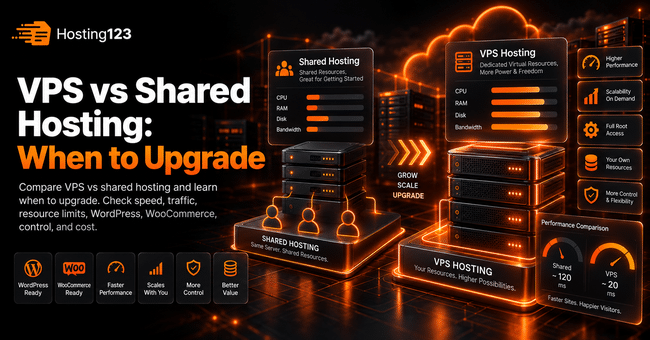
VPS vs shared hosting comes down to control, resources, and growth. Hosting123 recommends shared hosting for small websites and VPS or VDS for projects that need more stability, higher traffic capacity, and server-level control. Upgrade when slow speed, resource limits, or business needs start holding your website back.
Quick Answer: When Should You Upgrade from Shared Hosting to VPS?
You should upgrade from shared hosting to VPS when your website slows down often, hits resource limits, needs custom server settings, or handles business-critical traffic.
However, do not upgrade only because VPS sounds stronger. First, check traffic, CPU usage, RAM limits, storage, security, and support needs.
In short, upgrade when shared hosting limits growth.
What Is Shared Hosting?
Shared hosting means multiple websites use the same server environment.
This setup keeps costs low. It also gives beginners an easy way to publish a website without managing the server.
For small websites, shared hosting can work well. Blogs, portfolios, landing pages, and basic business websites often start here.
However, shared hosting has limits. Since many accounts share the same server resources, heavy usage can affect performance.
What Is VPS Hosting?
VPS stands for Virtual Private Server.
A VPS gives you a virtual server environment with more control than shared hosting. You can manage server settings, install software, and use dedicated portions of resources depending on the plan.
This flexibility helps growing websites, custom applications, and traffic-heavy projects.
Nevertheless, VPS also requires more technical responsibility. You need to think about updates, security, backups, and server configuration.
VPS vs Shared Hosting: Main Differences
Use this table to compare both options quickly.
| Comparison point | Shared hosting | VPS hosting |
|---|---|---|
| Cost | Usually lower | Usually higher |
| Control | Limited | Much higher |
| Resource access | Shared with other users | More isolated and flexible |
| Technical skill | Beginner-friendly | Requires more knowledge |
| Performance | Good for small websites | Better for growing projects |
| Custom software | Usually limited | Easier to install |
| Scalability | Limited | Better upgrade path |
| Best for | Small sites and beginners | Growing sites and advanced users |
This table gives you a quick overview. As a result, you can compare the real difference before upgrading.
1. Upgrade When Your Website Loads Slowly
Slow loading is one of the clearest signs that shared hosting may no longer fit your website.
Of course, hosting is not the only reason for slow speed. Large images, heavy themes, too many plugins, and poor caching can also create problems.
However, if you optimize the basics and your website still feels slow, server resources may be the issue.
Check these pages first:
- Homepage
- Main service page
- Blog posts
- Product pages
- Checkout page
- Contact page
Then test your website during busy hours. If speed drops when traffic rises, VPS can give you more room.
2. Upgrade When You Keep Hitting Resource Limits
Shared hosting plans usually include limits.
These limits may include CPU usage, RAM usage, inode count, disk space, database size, or traffic capacity.
At first, these limits may not matter. Later, as your website grows, they can block performance.
Common warning signs include:
- CPU usage warnings
- “Resource limit reached” messages
- Slow WordPress admin panel
- Failed backups
- Database errors
- Disk space warnings
- Email sending issues
If these warnings appear often, do not treat them as random errors. Instead, review a VPS or VDS plan.
3. Upgrade When Your Website Handles Business Traffic
A personal blog can tolerate small delays. A business website usually cannot.
If your website brings leads, sales, bookings, or customer requests, hosting performance becomes more important.
For example, a slow contact form can reduce inquiries. A slow checkout page can hurt sales. Likewise, repeated downtime can reduce trust.
Therefore, business-critical websites should use hosting that supports stability and growth.
For business and WordPress projects, you can review Hosting123’s WordPress Hosting plans.
4. Upgrade When You Need More Server Control
Shared hosting keeps server management simple. Yet that simplicity also limits control.
You may not be able to change certain server settings, install custom services, or configure advanced tools.
VPS hosting gives you more control over the environment.
You may need VPS when you want to:
- Run custom applications
- Configure server-level caching
- Install specific software
- Adjust PHP settings
- Manage cron jobs
- Control firewall rules
- Create isolated test environments
This control can help developers and growing businesses. However, it also requires careful management.
5. Upgrade When WordPress Becomes Heavy
WordPress can start small and become heavy over time.
Themes, plugins, page builders, forms, image galleries, membership tools, and WooCommerce all add load.
As a result, a shared hosting plan that worked last year may feel limited today.
Pay attention to these WordPress signs:
- Admin dashboard loads slowly.
- Plugin updates take too long.
- Backup plugins fail.
- WooCommerce checkout slows down.
- Search and filters respond late.
- Cache cleanup creates load spikes.
If your WordPress site keeps growing, VPS or VDS may become a better fit.
6. Upgrade When WooCommerce Needs Stable Performance
WooCommerce needs more resources than a basic WordPress blog.
Product pages, cart sessions, checkout steps, payment gateways, customer accounts, and order emails all create extra server activity.
Because of that, shared hosting may struggle during sales campaigns or busy periods.
Consider upgrading when:
- Checkout slows down.
- Product filters lag.
- Cart actions take too long.
- Orders increase.
- Campaign traffic creates spikes.
- Payment steps feel unstable.
For higher and more stable resources, you can review Hosting123’s VDS server packages.
7. Upgrade When You Need Better Isolation
Shared hosting places many websites in the same environment.
Good providers manage this carefully. Even so, shared environments have less isolation than VPS.
VPS gives your project a more separate environment. This can improve control, security planning, and performance consistency.
In addition, VPS can make testing and server configuration cleaner.
For growing websites, better isolation often becomes valuable before major campaigns or traffic growth.
8. Upgrade When You Plan a Migration or Redesign
A migration or redesign is a good time to review hosting.
If you already plan to move your website, rebuild pages, add WooCommerce, or launch new campaigns, hosting should match the new version of the site.
Do not move an improved website to an underpowered environment.
Before migration, compare your current plan with your next six months of growth.
If you already have a website, Hosting123’s free website migration service can help you plan a safer transfer.
VPS vs Shared Hosting Upgrade Checklist
Use this checklist before upgrading.
- Test your website speed during normal and busy hours.
- Review CPU and RAM usage reports.
- Check disk space and inode usage.
- Count active WordPress plugins.
- Review WooCommerce performance if you use it.
- Check support tickets from the last few months.
- Confirm backup reliability.
- Review security needs.
- Compare renewal and upgrade costs.
- Decide whether you need server-level control.
This checklist helps you avoid emotional decisions. It also gives you a practical reason to upgrade.
When Shared Hosting Is Still Enough
You do not always need VPS.
Shared hosting can still work well for small and simple websites.
It may be enough when:
- Your website is new.
- Traffic is low.
- You use a lightweight theme.
- You do not run WooCommerce.
- You use only essential plugins.
- Your site loads quickly.
- You do not need custom server settings.
In this case, a good shared hosting plan can save money while still supporting your website.
When VPS Is the Better Choice
VPS becomes more useful when your website needs stronger resources and more control.
It may be the better choice when:
- Traffic grows regularly.
- Shared hosting limits appear often.
- WordPress admin feels slow.
- WooCommerce performance matters.
- You run custom software.
- You need custom server settings.
- You want more isolation.
- You plan serious growth.
In other words, VPS is not only about power. It is also about flexibility and control.
Shared Hosting vs VPS Cost: What Should You Compare?
Price matters, but the lowest monthly fee does not always show the real cost.
Compare the full value before upgrading.
| Cost area | Shared hosting | VPS hosting |
|---|---|---|
| Monthly price | Lower | Higher |
| Management time | Lower | Higher if unmanaged |
| Control panel | Usually included | May cost extra |
| Backups | May be included | May cost extra |
| Security setup | Usually basic | Requires more planning |
| Performance room | Limited | More flexible |
| Upgrade path | Package-based | More customizable |
| Technical support need | Lower | Higher for unmanaged VPS |
This table helps you compare total cost, not only the monthly price.
Final Decision: Should You Upgrade from Shared Hosting to VPS?
Shared hosting works well for many small websites. However, it may become limiting as traffic, plugins, content, or business needs grow.
First, optimize your website. Then review speed, resource limits, downtime, support quality, and growth plans.
If shared hosting still meets your needs, stay with it. On the other hand, if it slows your website or blocks growth, VPS or VDS can become the smarter next step.
In conclusion, upgrade when your website needs more control, more stability, and more room to grow.
Frequently Asked Questions
What is the difference between VPS and shared hosting?
Shared hosting places multiple websites in the same server environment. VPS gives you a more isolated virtual server with more control, flexibility, and resource room.
When should I upgrade from shared hosting to VPS?
Upgrade when your website slows down often, hits resource limits, needs custom server settings, or handles business-critical traffic.
Is VPS faster than shared hosting?
VPS can be faster when your website needs more resources. However, speed also depends on optimization, cache, storage, PHP version, and server configuration.
Do I need VPS for WordPress?
Small WordPress websites can run on shared hosting. However, plugin-heavy sites, WooCommerce stores, and high-traffic WordPress projects may need VPS or VDS.